

Subtitle: Portable LAN discovery, pipeline reporting, and a 14-day Anti-Venom Monitor trial — one platform from first meeting to managed client.
Most MSPs, MSSPs, and vCISO practices still walk into a first meeting with a slide deck and a promise. The USB Prospecting Tool lets you walk in with evidence.
It is a self-contained Windows assessment application — no .NET install on the prospect PC, no agent deployment, no policy enforcement. Run a LAN discovery scan on site, export a leave-behind summary, upload results into the Prospecting Center, and generate a branded HTML report before anyone signs a contract.
Who it is for: MSP and MSSP sales teams, field technicians, and vCISOs doing on-site or air-gapped prospect visits. Direct commercial clients with an MSP partner use the same pipeline when their provider runs assessments.
Get started: Sign in at dual-strike.com, open Tenants and Prospects → Prospects, and download the Prospect Scanner USB Win64 package from the MSP download card. This tool is partner-only — it is not on the public agent downloads page.
Why this is a game changer for MSPs, MSSPs, and MIPs
Assessment before the contract. You do not need prospect IT to install software, open firewall ports, or provision a tenant before you can show value. One permitted run on a workstation gives you a network map, host inventory from discovery, open ports, and remote-access signals — enough to anchor a credible first conversation.
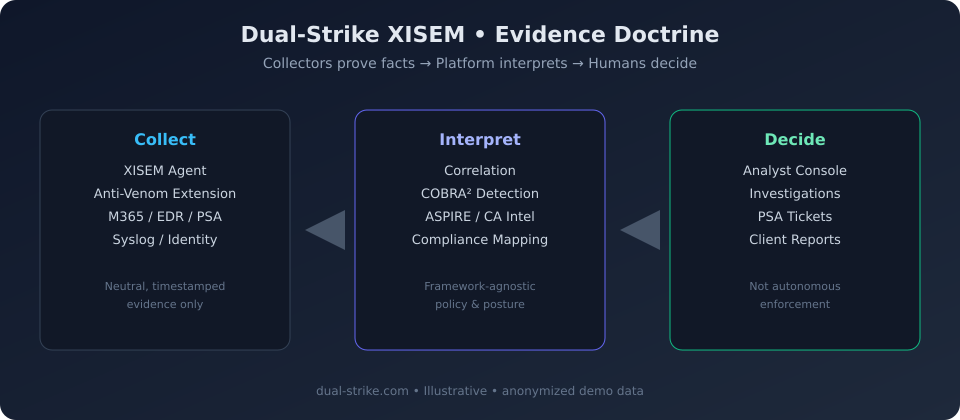
One platform from prospect to client. USB scans land in the same Dual-Strike XISEM console as production agents. When the deal closes, you are not migrating tools — you are extending coverage. Full posture sections — Active Directory, patching, security tools, browser posture — unlock after XISEM Agent enrollment on managed endpoints.
Pipeline built in, not bolted on. The Prospecting Center tracks stages from Identification through Result, pipeline value, next actions, and prospect types including One-Off, MSP, MSSP, and Trial. Inbound leads from marketing pages and SuperOps trial imports feed the same funnel.
Free assessment edition. Unlike stacks that charge for discovery appliances or per-seat assessment SKUs, the USB Prospecting Tool ships with XISEM partner releases at no separate assessment license. Your cost is technician time — not another product line item.
What the USB Prospecting Tool does
LAN discovery scan
The scanner runs native on-network discovery: ICMP reachability, ARP cache, reverse DNS, TCP port checks, and OS hints. Results use the same contract as XISEM Agent NetRecon, so findings correlate cleanly when you enroll agents later.
Typical first-meeting outputs include:
Remote hosts — IP, hostname, MAC where available
Open ports and inferred services
Weak OS fingerprint guesses
RMM and remote-access tools inferred from open ports
Local JSON and HTML archives beside the executable for leave-behind
Three ways to link a scan to your pipeline
Choose the mode that fits the visit:
New prospect — enter company name; the platform creates the prospect record on first upload.
Link code — enter the eight-digit code from the prospect detail dialog in the console. Codes expire after thirty days.
Signed in — authenticate with your Dual-Strike credentials and pick from your active prospect list.
Multi-PC and multi-subnet site visits
Large sites rarely fit on one machine. Copy the tool to an encrypted USB drive. The first PC creates or links the prospect. Each additional PC appends scan sections to the same prospect record. Unique scan IDs keep every run traceable.
Scan offline if needed. Upload when you have connectivity and a configured infeed token.
Headless automation
For scripted field kits, run XISEM.ProspectingScanner.App.exe --nogui "Company Name" to scan and upload without the graphical interface.
Override scan targets with the XISEM_SCAN_TARGET environment variable when you need a specific CIDR or IP list.
Prospecting Center: reporting and sales workflow
After upload, open the prospect in Tenants and Prospects → Prospects.
Sales pipeline
Track six stages — Identification, Initial Meeting, Assessment, Quotation, Proposal, and Result — with status, estimated value, close dates, and upcoming actions. The funnel chart shows where active deals sit at a glance.
Scan Data and HTML reports
The Scan Data tab shows structured sections from every upload. Click Generate Report for a downloadable HTML assessment.
USB-only runs are labeled LAN Discovery Assessment. Sections that require agent enrollment — AD, host inventory, patching, security tools — are marked Available after enrollment, which sets honest expectations and creates a natural upsell path.
Reports are print-friendly: clean typography, metric cards, and finding callouts designed for executive readouts and PDF export from the browser.
Integrations that close the loop
Link prospects to SuperOps accounts, Hudu companies, and trial IDs. Hudu sync modes — automatic, manual, or conversion-only — keep documentation aligned with your PSA workflow.
Import SuperOps trial orgs directly into the pipeline with Import Trials.
Anti-Venom Monitor: 14-day trial inside Prospecting
Starting with Prospecting workflows, partners can offer prospects a 14-day Dual-Strike XISEM platform trial that includes Anti-Venom Secure Access in Monitor mode.
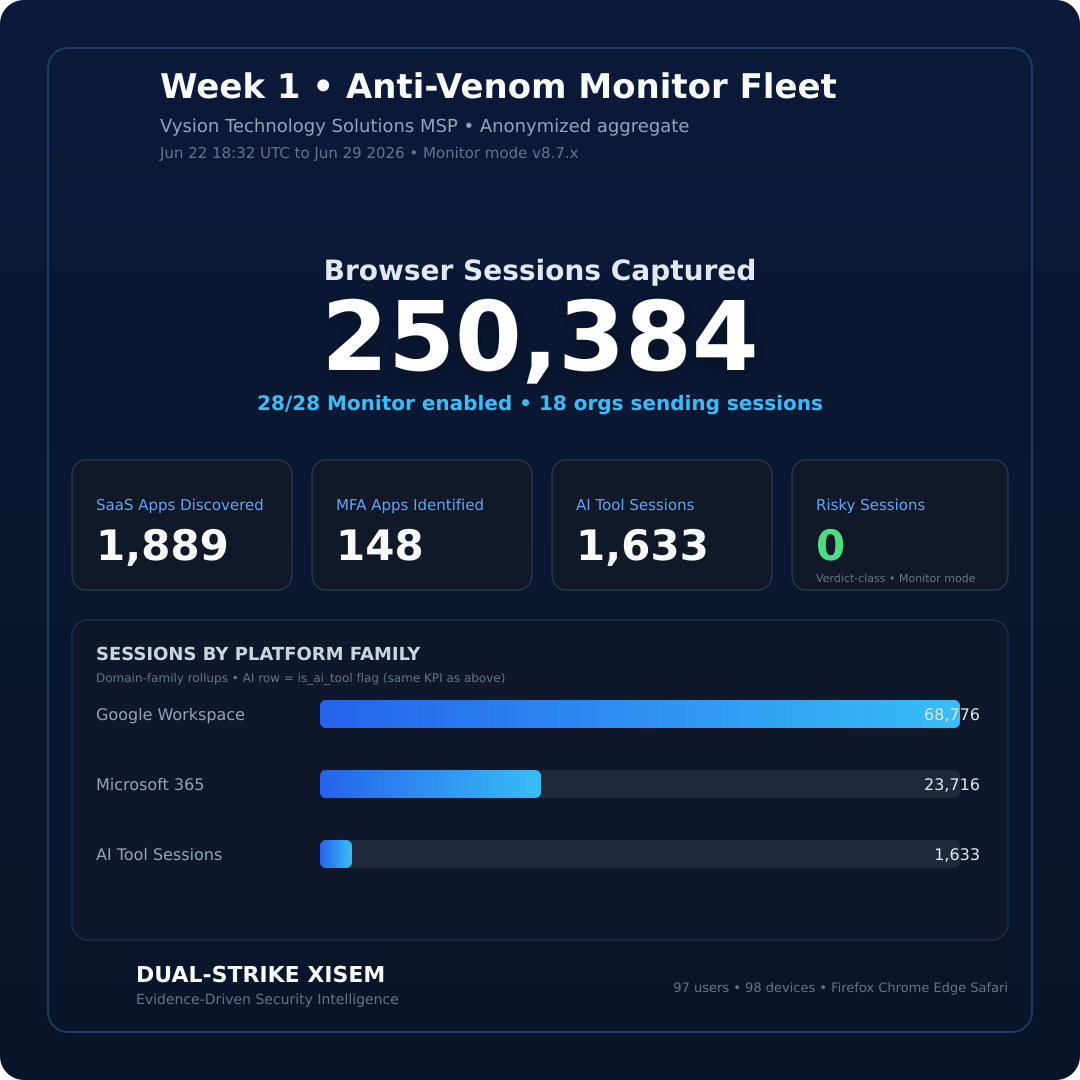
Monitor mode is observe-only. It runs full indicator lookups and provider feed validation without watermarks or blocking. Your prospect sees real browsing telemetry — SaaS usage, AI tool sessions, MFA app patterns — while you build the case for Protect mode after contract signature.
Recommended prospect journey:
Day zero — USB LAN discovery at the first meeting. Leave behind local HTML summary.
Day one — Upload to Prospecting Center. Generate branded LAN Discovery report for IT leadership.
Days one through fourteen — Deploy XISEM Agent to a pilot group. Enable Anti-Venom Monitor on Chrome, Edge, Firefox, or Safari. Review Browsing Insights with the prospect.
Day fourteen — Walk through ASPIRE posture, Threat Center context, and a scoped proposal. Convert prospect to client.
The platform trial supports up to five client tenants with no credit card required. Pair it with the USB assessment for a complete pre-contract story: network truth on day zero, browser truth by day seven.
What it does not do
Be direct with prospects:
The USB tool does not replace production XISEM Agent deployment.
It does not send data without your configured upload and explicit action.
It does not enforce policies, block users, or install persistent services — assessment only.
Full posture sections require agent enrollment after conversion.
That honesty is a feature. Prospects trust read-only snapshots. Production monitoring uses the same evidence doctrine with continuous correlation in Dual-Strike XISEM.
Field workflow checklist
Download the USB package from Prospecting Center. Extract to an encrypted USB drive.
Optionally place
prospect_scanner.settings.jsonbeside the executable with your infeed token.Run on a prospect workstation with written permission.
Review findings with the IT lead on site.
Upload to XISEM. Open Scan Data and generate the HTML report.
Start the 14-day trial with Anti-Venom Monitor on pilot endpoints.
On signature: convert prospect, deploy fleet agents, and advance Monitor to Protect when ready.
Talk track
> "This is a read-only LAN discovery snapshot — no agents installed, no blocking, no data leaving your network until you approve upload. If we partner, the same platform carries from this assessment through managed monitoring, browser security, and compliance reporting. We can even run Anti-Venom in Monitor mode for two weeks so you see real browsing telemetry before anything is enforced."
Related reading: MSP first 7 days quickstart · ASPIRE scoring · Evidence doctrine infographic
Next step: dual-strike.com · Partner program at /get-xisem/msp · Request a demo
Illustrations use anonymized demo data. USB Prospecting Tool version aligns with current XISEM GA releases — check the Prospecting Center download card for build number and SHA-256.