

Subtitle: Healthy, idle, stale, not detected — what each tier means for MSPs.
Extension Health answers the question every vCISO asks after deploying Anti-Venom: “Is it actually running on the browsers we care about?” It lives in Browsing Insights and the Asset modal, with tier logic designed to reduce weekend false alarms on spare laptops.
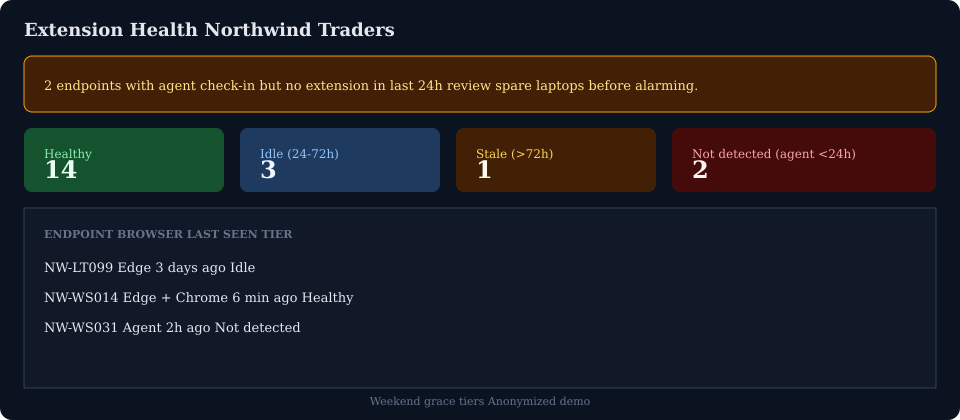
Tier definitions (operator-facing)
TierMeaningTypical action HealthyExtension reported within normal windowNone IdleNo extension ping 24–72h; agent may still check inVerify user on PTO / spare device StaleNo extension >72h; agent still presentSchedule revisit or decommission asset Not detectedAgent active <24h but no extensionDeploy/repair extension urgently
Key nuance: A laptop unused since Thursday should land Idle, not Not detected, when agent check-in is older than 24h but younger than 72h.
Orange banner semantics
The warning banner counts endpoints where:
Agent is recently active (<24h), AND
No extension has reported
It excludes long-idle spare machines from the urgent count — truthful coverage without noise.
By-browser columns
Users often run Edge + Chrome. Health is per browser, not per device:
Edge Healthy + Chrome Not detected → reinstall Chrome extension only
Both Not detected with active agent → GPO/store deployment issue
Rollout verification checklist
Deploy agent → wait for check-in
Install extension from official store listings (8.7.x line)
Browse one site → session in Browsing Insights within 15 min
Extension Health → Healthy
Repeat for second browser if dual-browser standard
Pair with COBRA²
Rule: “Extension gap on active user workstation” should fire only on Not detected + recent agent, not Idle spare pool.
Route: /browsing-insights → Extension Health tab
Related: Browsing Insights field guide · Anti-Venom Edge GA post
Illustrative demo data — tiers reflect 8.7.0.17 platform behavior.